
You enrolled in 12th grade and purchased the Graduation Program.
Take your time. This is meant to be a meaningful exercise, not a stressful one.
In order to receive your transcript and diploma, here are the steps to take:
Research your post-graduation plans. If you are applying to a US university and are using the Common App or Parchment for your application, please let us know.
Work with Raelyn on your In-Progress transcript so a mid-year report can be uploaded to Common App if necessary.
Review the Graduation Project requirements and begin working on it.
Attend the Graduation Program Q&A Zoom calls.
Submit your Graduation Project no earlier than April 1.
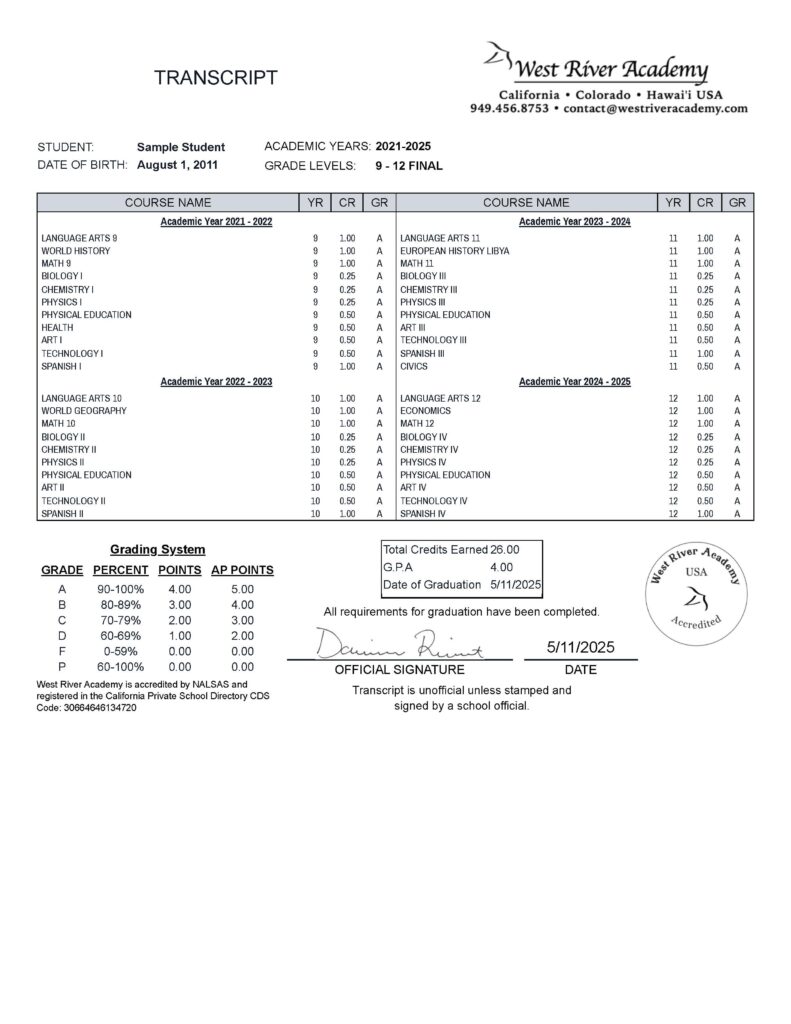
After your project is approved, finalize your transcript with Raelyn. Your transcript must be completed and approved by you before your diploma can be issued.
If you plan to present your diploma and transcript to a Ministry of Education or university outside the US, order 2 Apostilles and Shipping. Allow 4-6 weeks for the Apostilles to be processed.
And finally, we hope you will join us for the Virtual Graduation Ceremony, held in May or June! You will receive an invitation with more details in February.
What is the Graduation Project?
This project is the culmination of all that you have learned and experienced up until now. The process of reflecting on your educational journey is designed to be of great value to you. You can go through old family pictures to spark memories of your upbringing or interview family members to hear their perspectives. This is meant to be a fun and fulfilling exercise, so take your time and enjoy the project!
YOUR PROJECT
Choose your format
There are two ways to present your educational journey.
Educational Biography
A written account of your educational journey from as far back as you can remember to the present. Use any resources you need to finalize your paper so that it meets the requirements below.
- Minimum 3 full pages of text - photos and images do not count toward the page requirement
- Single spacing
- Times New Roman font, size 12
- 12th-Grade language standards
- No grammar, punctuation or spelling errors
- Proper paragraphing
Custom Project
Submit a proposal for a Custom Project that illustrates your educational journey. It must be approved before you start working on it. All written sections must meet 12th-grade language standards.
Some project ideas are:
- Multimedia presentation
- Artwork with written narrative
- Personally edited video
Send your proposal to graduation@westriveracademy.com.
YOUR TRANSCRIPT
Building your final high school transcript
You will receive an email from Raelyn inviting you to start working on your transcript. She will provide instructions on how to enter courses, credits and grades. Be sure to watch the tutorial which appears in the pop-up before you start working on your transcript.
You can start now
Grades 9 through 11
In your portal, click on “Build your transcript” in Additional Services.
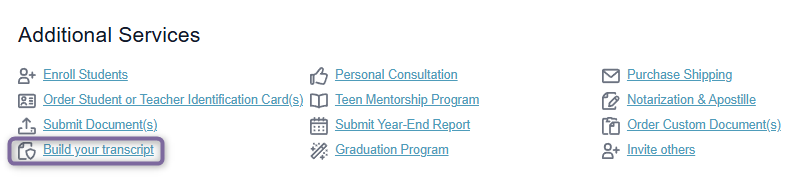
Enter courses, credits and grades for Grades 9, 10 and 11. Click “Save Progress”.
You will be able to enter Grade 12 courses, credits and grades after you pay your Grade 12 fees.
When to submit your project
August-July Academic Year
Submit April 1 - July 31. We recommend submitting as soon as possible after April 1. The absolute deadline is July 31. If it’s submitted after the deadline, an extension fee of $300 will be charged, and you will have until July 31 of the next year to submit your project and complete the transcript.
February-January Academic Year
Submit November 1 - January 31. We recommend submitting as soon as possible after November 1. The absolute deadline is January 31. If it’s submitted after the deadline, an extension fee of $300 will be charged, and you will have until January 31 of the next year to submit your project and complete the transcript.
You are eligible to participate in our virtual graduation ceremony as long as your Graduation Program is in progress:
August–July ceremony
Typically held in May. The exact date is announced each year.
February–January ceremony
Typically held in December. The exact date is announced each year.
SUBMIT YOUR PROJECT
Review your project BEFORE you submit it to be sure all the requirements are met: 3 full pages, proper paragraphing, Times New Roman size 12 font, and no grammar, punctuation or spelling errors. Any revisions required will delay the timeline for receiving your diploma and transcript.
After your Project is submitted
You will receive an email acknowledging your submission. Please allow up to 10 days to receive feedback. This may include the need to revise your project to meet our standards.
After your project is approved by Rachel, you will receive an email from our Transcript Advisor, Raelyn, to finalize your transcript. Be sure to check for this important email because your final approval of your transcript is required.
After your final transcript is approved, your diploma will be issued and directly mailed to you if you are in the US. You should receive it in about 10 days. If your documents need to be sent for Apostilles, we will start this process and email you with a tracking number when they have been shipped to you.
You may download a digital version of your final transcript. It will be uploaded to Common App or Parchment if you have instructed us to do so. Upon request, we can provide a digital version of your diploma. Please make this request to Raelyn when you are working on your final transcript with her.
Applying to a U.S. school or university?
We can submit your transcripts and a letter of recommendation via the CommonApp portal or through the secure digital delivery service Parchment. Diplomas are only provided as an original to you, and we do not have a digital copy to provide to Universities. Let us know when you email the Graduation team, so we can flag your documents for CommonApp or Parchment delivery.
Have questions?
If you have additional questions, email the Graduation team.
